Sleep sounds app

Sounds of the night, mixed your way.

Rain on a tent, waves on the shore, crickets in a summer field. Mix calm sounds, breathe slowly, and let the timer fade them out — offline, with no account.

Coming soon to Google Play and the App Store

See what's inside
Luleep home screen: an evening greeting, your mixes, shortcuts to sleep tracking and the breathing exercise, sound tiles with night photos and a Menu button in the bottom bar
  • 19calm sounds
  • 10breathing techniques
  • 7languages
  • 4free sounds
  • Works offline
  • No account

One night with Luleep

From the first sound to the morning alarm.

  1. Sounds

    Tap a sound. Then another.

    Every tile is a calm, seamless loop. Turn on several at once and they play together — all night, offline. The Menu button gathers sleep tracking, breathing, your mixes and settings in one place.
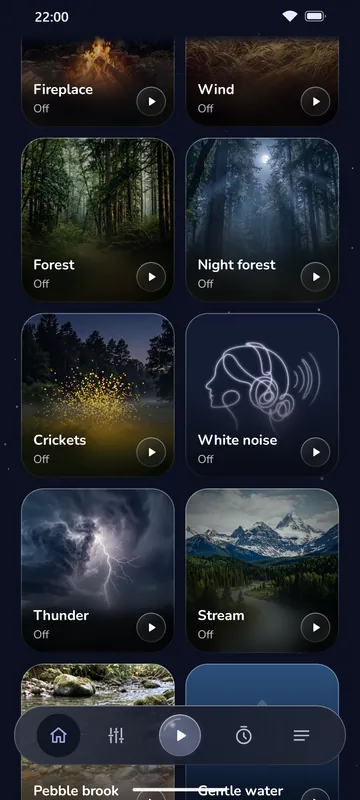
    Luleep sound grid with photo tiles for the sounds and a Menu button in the bottom bar
  2. Mix

    Layer the night. Balance it by hand.

    Start with a night forest, add crickets, keep the waves low. Every sound gets its own round knob, and one overall volume keeps the balance as you turn it down.

    • A volume knob for every sound
    • Save mixes with a name and switch between them from the lock screen
    • Free: up to 2 sounds at once. Premium: as many as you like.
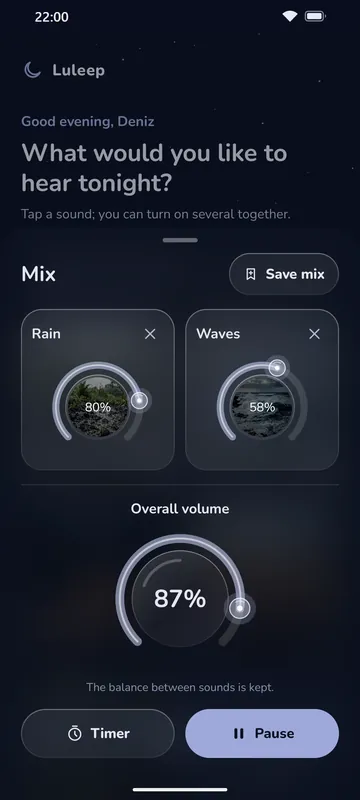
    Luleep mixer: each playing sound has its own round volume knob, above an overall volume knob
  3. Sleep timer

    A timer that fades out, never cuts off.

    Pick 15, 30, 45, 60 or 90 minutes. When time is up, your sounds fade out over 30 seconds and stop — even with the screen locked.

    PremiumAny length up to 11 h 59 min, and your own default
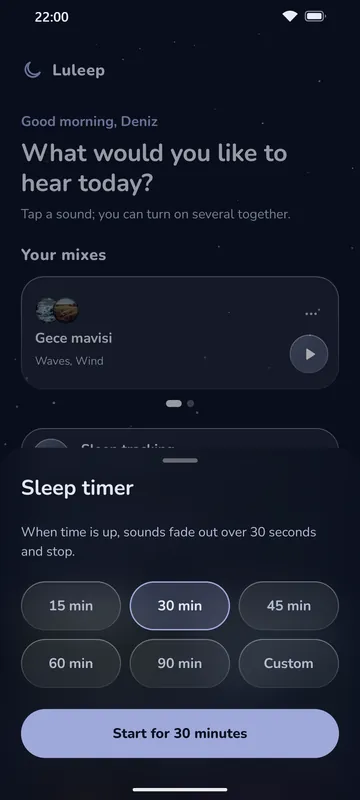
    Luleep sleep timer: presets from 15 to 90 minutes, a custom length and a start button
  4. Breathing exercise

    Slow down before you sleep.

    Swipe through the techniques, then follow a glass orb as it grows and shrinks, with a breath curve that shows what's next. With your eyes closed, a gentle vibration and a soft chime guide you, and your mix keeps playing softly.

    Ten ways to breathe out the day.

  5. Sleep schedule Free

    A bedtime you can keep.

    Set bedtime and wake-up on a 24-hour dial and see whether it meets your sleep goal. At bedtime a gentle reminder offers to play your mix or start a breathing exercise, and a wake-up alarm can ring on the days you choose.

  6. Smart alarm Premium

    Wake up a little lighter.

    Choose a 10, 20 or 30-minute window. If sleep tracking notices signs of light sleep — movement or sound — Luleep wakes you a little early. If it notices none, the alarm rings at the time you set, never later.

  7. Sunrise Premium

    Wake up to a sunrise.

    Before your alarm, a gentle sound and a warm light slowly rise on the screen — over 5 to 30 minutes — while your night mix fades away. Birdsong by default, or waves, a stream or wind.

  8. Widgets

    Bedtime, right on your home screen.

    The Mixes widget plays a saved mix with one tap. The Night panel shows what's playing and the time left, with quick timers and shortcuts to breathing and sleep tracking.
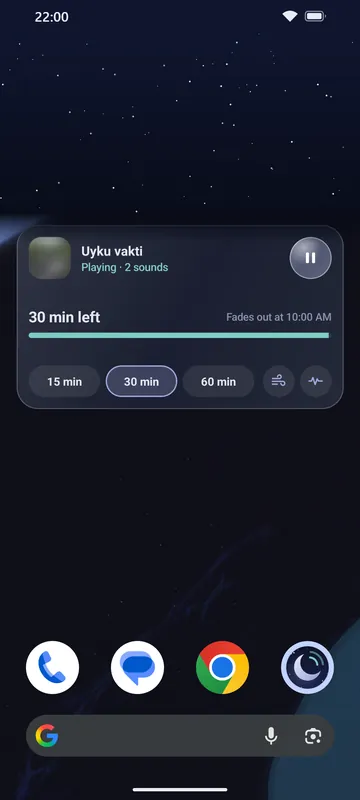

    An Android home screen with the Luleep Night panel widget: the sound playing, quick timer buttons and shortcuts
Luleep sound grid with photo tiles for the sounds and a Menu button in the bottom bar
Luleep mixer: each playing sound has its own round volume knob, above an overall volume knob
Luleep sleep timer: presets from 15 to 90 minutes, a custom length and a start button
An Android home screen with the Luleep Night panel widget: the sound playing, quick timer buttons and shortcuts

Space Premium

Put the night around you.

In the mixer's Space tab, drag each sound around your head: rain behind you, the fire on your left, birds far ahead. Closer to the centre sounds nearer. Space is heard on headphones; on the speaker the normal mix plays.

Put on headphones and tap “Listen with headphones”. Then drag the sounds — or select one and move it with the arrow keys.

A short web demo made from Luleep's own rain, fireplace and birds. In the app, every sound in your mix can be placed.

Smart sound

Calm, even when the night isn't.

Luleep can respond to your room — only when you turn these on.

  • Adjust to noise Premium

    When outside noise comes in — traffic, voices, a partner's snoring, a dog — your sounds rise a little for that moment, then settle back. Light, medium or strong. The microphone only measures the noise level, on your phone; nothing is recorded.

  • Pause when flipped Free

    Turn the phone face-down: the sound fades out and pauses. Turn it back within 5 seconds to undo. Off until you turn it on.

Breathing exercise

Ten ways to breathe out the day.

Calm breathing is free. Premium adds nine more techniques and a custom length. When you finish, “Go to sleep” dims the screen and starts a 30-minute sleep timer.

  • Calm breathingin 4 · out 6Free
  • 4-7-8 breathingin 4 · hold 7 · out 8Premium
  • Box breathingin 4 · hold 4 · out 4 · hold 4Premium
  • Long exhalein 4 · out 8Premium
  • Coherent breathingin 5.5 · out 5.5Premium
  • Triangle breathingin 4 · hold 4 · out 4Premium
  • 7-11 breathingin 7 · out 11Premium
  • Double inhalein 2 · 1 more · out 6Premium
  • Slowing breathout grows from 4 to 8Premium
  • Alternate nostril breathingin 4 · hold 2 · out 6Premium
  • VibrationFeel each step with your eyes closed.
  • Soft chimeA quiet tone when the breath changes.
  • Keep the mix playing softlyYour sounds carry on underneath.
  • Go to sleepThe screen dims and a 30-minute timer starts.

If you feel uncomfortable, go back to your normal breathing. The exercises are for relaxing before sleep, not a treatment.

Sleep tracking Premium

Find out what your nights sound like.

Leave your phone by the bed. Luleep listens for snoring, sleep talking and coughing, then shows you a calm summary in the morning — with day, week and month views.

Luleep monthly sleep statistics with a bar chart of time asleep and snoring
Luleep night summary: time asleep, snoring, sleep talking and coughing during the night
Luleep sleep tracking with an alarm set between 6:30 and 7:00 am and a Start tracking button
  • Snoring, sleep talking and coughing
  • Day, week and month views
  • Your sounds and timer keep playing

Night highlights Premium

Hear the moments that mattered.

Off unless you turn it on. Luleep doesn't record the night: it keeps only short clips of the moments it notices — sleep talking, the loudest and the longest snoring, a cough, a dog or a door — at most 8 a night, each up to 15 seconds. They stay only on your phone, are never sent anywhere, aren't included in backups and are deleted after 7 days unless you star them.

Other people in the room may be heard too — please let them know before you turn it on.

Smart alarm

An alarm that listens before it rings.

Set a wake-up time and a 10, 20 or 30-minute window. Within it, Luleep wakes you as soon as it notices signs of light sleep (movement or sound) — or exactly on time. In the morning the summary shows whether you got up with the alarm, after snoozing, or slept on.

  • Got up with the alarm
  • Got up after snoozing
  • Slept on after the alarm

Analysed on your phone. No audio is ever sent anywhere.

Luleep is not a medical device. Results are estimates based on sounds near your phone, not a diagnosis. The smart alarm does not measure sleep stages.

Details

Small things, done carefully.

  • Lock-screen controls

    Pause, play and skip between your saved mixes from the lock screen and notifications, without opening the app.

    Android media controls for Luleep, as shown on the lock screen: the saved mix “Rainy cabin” with previous, pause and next buttons
  • Seven languages, picked in the app

    English, Türkçe, Español, Português (Brasil), Deutsch, Français, 日本語.

    Choose Luleep's language in the menu, separately from your phone's.

  • Home-screen widgets

    Mixes and Night panel, in several sizes.

  • Everything in one menu

    Sleep tracking, breathing, your mixes, the timer and settings.

  • Works offline

    No signal needed, ever — sounds, breathing and the alarm.

  • No account

    Open it and listen.

  • Seamless loops

    Sounds that never hiccup.

  • A greeting for the hour

    Good evening, or good night — with your name, if you like. It stays on your phone.

Privacy

Your nights stay yours.

Luleep has no accounts. The free version shows a few ads (with your consent where required); Premium is ad-free. Usage statistics are shared only if you say yes. Your name, your sleep summaries and your alarm results stay on your phone — they aren't even included in Android backups.

  • No account

    Nothing to sign up for.

  • Quiet at night

    No ads while sound plays or sleep tracking runs. Premium is ad-free.

  • Stats only with your OK

    Usage stats are shared only if you say yes, and never used for ads.

  • Stays on your phone

    Delete your nights anytime.

If the app crashes, a technical crash report (phone model, Android and app version, error log) is sent to Google Firebase so we can fix the problem. Usage statistics (for example which sounds are played and for how long) are sent only if you agree when the app asks. Neither ever includes your name, audio or your sleep-tracking nights, and you can turn both off in Settings.

Premium

Free to start. Premium when you want more.

What the free version and Luleep Premium include
FeatureFreePremium
Rain, waves, brown and pink noiseIncludedIncluded
All nineteen soundsNot includedIncluded
Mix soundsUp to 2 at onceUnlimited
Volume knob for every soundIncludedIncluded
Space: place sounds around your head (headphones)Not includedIncluded
Adjust to noiseNot includedIncluded
Pause when flippedIncludedIncluded
Sleep timer 15–90 min with fadeIncludedIncluded
Custom timer up to 11 h 59 minNot includedIncluded
Your own default timerNot includedIncluded
Sleep schedule, bedtime reminder and wake-up alarmIncludedIncluded
Breathing: calm breathingIncludedIncluded
Nine more breathing techniques and a custom lengthNot includedIncluded
Play your last mix in one tapNot includedIncluded
Save and name your mixesNot includedIncluded
Lock-screen controlsIncludedIncluded
Skip between saved mixes on the lock screenNot includedIncluded
Home-screen widgetsIncludedIncluded
Sleep tracking and smart alarmNot includedIncluded
Sunrise before the alarmNot includedIncluded
Night highlights (short clips, only on your phone)Not includedIncluded
Offline, no accountIncludedIncluded
No adsNot includedIncluded

Premium is a monthly or yearly subscription through Google Play. Prices will be shown in the app. Subscriptions renew automatically unless cancelled; cancel anytime in Google Play › Subscriptions. The yearly plan may include a 7-day free trial.

FAQ

Questions, answered.

Something else on your mind? Write to us at hello@luleep.com.

When can I get Luleep?

Luleep is coming soon to Google Play and the App Store. We'll update this page on launch day.

Is Luleep free?

Yes. Rain, waves, brown noise and pink noise, mixing two sounds at once, the sleep timer, the sleep schedule with its reminder and wake-up alarm, calm breathing and the widgets are free. Premium adds the other fifteen sounds, unlimited mixing, custom timer lengths, nine more breathing techniques, saved mixes, sleep tracking and the smart alarm.

Does it work without internet?

Yes. All sounds are on your phone, so Luleep plays in airplane mode too. Breathing exercises, sleep tracking and the alarm work offline as well.

Do I need an account?

No. There's nothing to sign up for.

Will sounds keep playing when the screen is off?

Yes. Sounds and the sleep timer keep working with the screen locked, and you can control them from the lock screen.

Which breathing exercises are there?

Calm breathing is free. Premium adds 4-7-8 breathing, box breathing, long exhale, coherent breathing, triangle breathing, 7-11 breathing, double inhale, slowing breath and alternate nostril breathing, plus a custom length. They are for relaxing before sleep, not a treatment; if you feel uncomfortable, go back to your normal breathing.

How does sleep tracking work? Is audio recorded?

While tracking is on, Luleep uses the microphone and analyses sound on your phone to notice snoring, sleep talking and coughing. A notification shows the whole time. No audio is ever sent anywhere. Unless you turn on “Save important moments”, no audio is recorded or stored either — only what's noticed (type, time and length) is kept on your phone, and you can delete it anytime. With Night highlights on, short clips of the important moments are kept only on your phone (see “When does Luleep use the microphone?”). If you allow usage statistics, only rough counts for the night are shared.

When does Luleep use the microphone?

Only while sleep tracking or “Adjust to noise” is on, and a notification shows the whole time. Sound is analysed on your phone and no audio is ever sent anywhere. Nothing is recorded or stored unless you turn on “Save important moments” (Night highlights): then only short clips of the night's important moments are kept, only on your phone, and deleted after 7 days unless you star them.

What is Space sound?

It's part of Premium. In the mixer's Space tab you drag each playing sound around your head — in front, behind, left, right, near or far — and hear it there on headphones. On the phone's speaker the normal mix plays. You can try a small demo on this page.

What does the smart alarm do?

If you set an alarm together with sleep tracking (Premium), you choose a 10, 20 or 30-minute window before your wake-up time. Within it, Luleep wakes you as soon as it notices signs of light sleep, such as movement or sound; if it notices none, the alarm rings at the time you set — never later. Afterwards the morning summary estimates whether you got up with the alarm, after snoozing, or slept on. It's an estimate based on sounds near your phone: it doesn't measure sleep stages, and no audio is recorded for it.

Does Luleep collect any data?

Only a little, and never your name, audio or sleep-tracking nights. There's no account. The free version shows a few ads through Google AdMob, which uses your advertising ID (with your consent where required); Premium is ad-free. If something goes wrong, a technical crash report (phone model, Android and app version, error log) is sent so we can fix it. On first launch Luleep asks whether to share usage statistics (which screens and sounds are used, rough listening times); nothing is sent unless you say yes. You can turn crash reports and usage statistics off in Settings at any time.

Is Luleep a medical device?

No. Luleep is for relaxation. Sleep tracking results are estimates, not a diagnosis. If you're worried about your sleep, talk to a doctor.

Which languages does Luleep speak?

English, Turkish, Spanish, Portuguese (Brazil), German, French and Japanese.

Also from us: Luleep Kids

Calm sounds and a night light for your baby's bedtime, without an account or ads. Coming soon.

See you at bedtime.

Luleep is almost ready.

Coming soon to Google Play and the App Store